
Your application image needs more than your code: it may also need a language runtime, system libraries and certificates. A base image supplies that starting environment. Choosing the wrong one can produce a small image that cannot run a required library or an easy-to-debug image that contains packages you never use.
Alpine is a small Linux distribution that uses musl rather than the glibc library expected by some prebuilt software. Distroless images provide selected runtime components without the usual shell and package manager. A fuller distribution image provides more familiar tools and libraries, at the cost of more software to maintain. These are choices about what your application needs; image size alone does not establish security.
Compare the same application
Build identical application functionality against each candidate. Record the application dependencies, architecture, base digest and build options. Alpine's libc environment can differ from glibc-based distributions; verify native extensions and binary dependencies. Distroless images intentionally omit many ordinary operating-system tools, which changes debugging and startup assumptions.
- Run functional tests, DNS/TLS checks, time-zone behavior and required native libraries.
- Inspect the final image contents and runtime user.
- Measure compressed image size, startup and resource use on the same platform.
- Scan with the same scanner/database date and inspect package-identification differences.
- Rebuild after an upstream base update and confirm deployment still works.
Make patching repeatable
Pin artifacts for reproducibility, then deliberately update them. A digest that never changes is reproducible but can become stale. Record how an upstream security release triggers rebuild, test, signing and rollout of dependent applications.
Plan debugging before an incident
If the runtime image has no shell or package manager, provide a supported diagnostic path using logs, metrics and authorized debugging tools. Adding a shell to every production image is not the only option, but removing it without an alternative can increase recovery time.
The historical comparison remains a record of earlier images. This update contains no new image-size leaderboard or scanner score because those require fresh builds. Use the same small application and declared environment for a reproducible result, then connect the choice to scanning and artifact admission.
Which base image should you choose?
Choose Alpine when your application and native dependencies have been tested with its library environment. Choose a distroless image when its supplied runtime is sufficient and you have a way to diagnose failures without a shell inside the application container. Choose a fuller distribution image when required libraries or support procedures depend on it. In every case, rebuild and test when the base receives security fixes; changing the image family does not remove that work.
Historical Kubedex content
Original publication: 2018-10-13T15:55:42+00:00. Preserved for context. Commands, versions, prices and results below reflect the original research.
Last Updated on December 10, 2018
This is a comparison of Linux base images that work well in containers. As you may expect by now this article will contain some outrageous parts.
Before we begin lets just say that the best base image is no base image at all. If you are running statically compiled binaries like those produced by Golang then just use from scratch images. I’d assume most aren’t so lucky and perhaps want to standardise on an image that gets vulnerability scanned as part of their CI pipeline. If you are one of those then read on.
What did I end up comparing? There aren’t actually that many options. I compared variations of Redhat, Debian and Ubuntu against our incumbent but soon to be displaced Alpine image.
If you’re wondering why we want to replace Alpine read my article about container scanning. In a nutshell our security team at work isn’t that happy with the infrequency of patches and the limited CVE database.
I also think it’s good to review the landscape from time to time. In this particular case other base images have made reductions to their size. They also come with a much smaller package footprint. Both of these factors result in Alpine not providing much advantage nowadays.
As per tradition here’s a screenshot of an excel spreadsheet that I’ll link below.
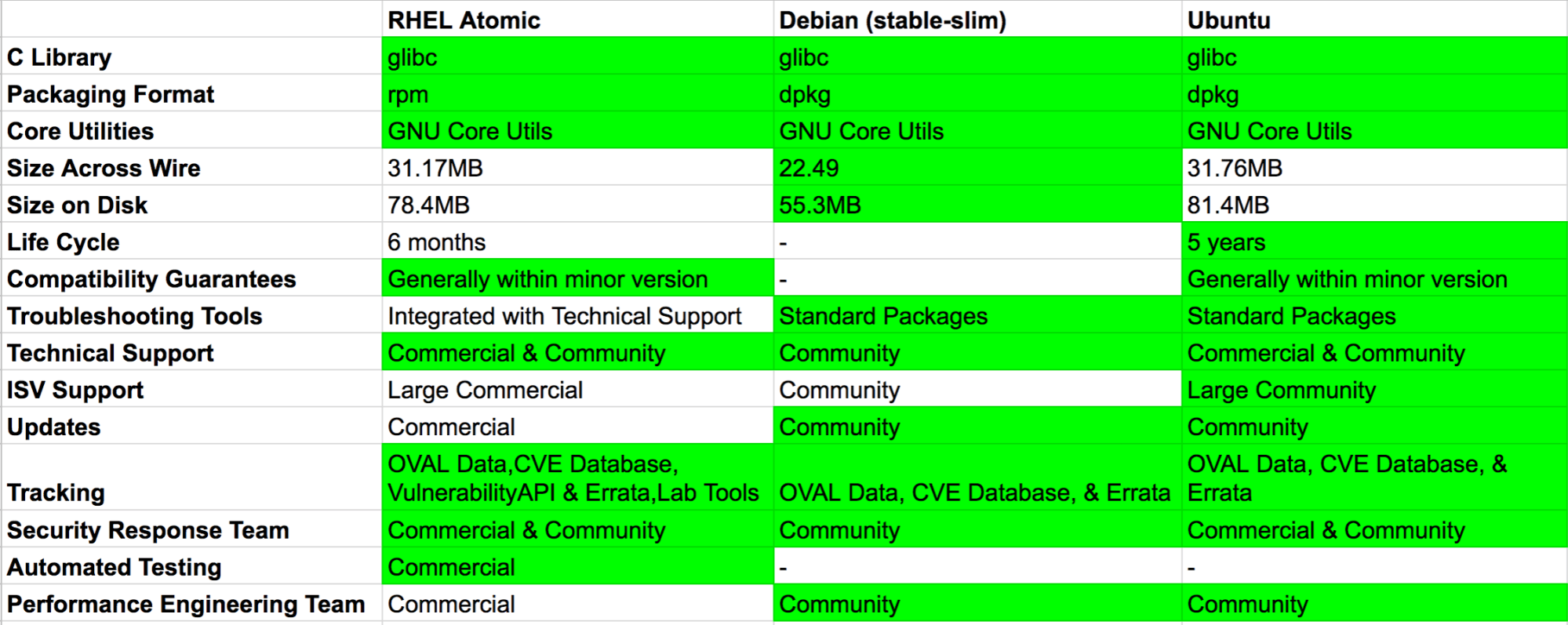
You can open and comment on the spreadsheet here.
Before I continue I’d like to thank Scott McCarty for creating an exceptional blog on this subject. You will notice that I’ve copied his table and to be honest haven’t added much to it other than compare other options.
As you can see from the image I narrowed down my selection to RHEL Atomic, Debian and Ubuntu. What they all have in common is access to a CVE database where vulnerabilities can be looked up. They have also been slimmed down by their creators to reduce the number of packages and ultimately their size.
I’ll go through them one at a time and then summarize at the end as usual. After that I’ll throw in a bonus table showing the others that I tried.
Redhat
Fedora and Centos don’t come with access to a CVE database so I excluded these. This left RHEL Atomic which requires a paid subscription to use. Or at least I think it does according to this Reddit thread.
My preference, or bias if you want to call it that, was actually a Redhat based distribution when starting this blog. This is what I’m most familiar with after using it at work for the past few years. However, we’ve always used it in the form of Centos or AWS Linux. Companies I’ve worked for have never paid for a RHEL subscription.
Is the RHEL subscription cost worth it for access to the CVE database? I don’t know, but clearly Redhat employs people to run this so it’s not unjustified that they should want money.
It does unfortunately mean that I can’t really recommend Redhat as a base image to people without a subscription. The other annoying thing that seems to be happening with Redhat is a walled garden is building up around Kubernetes. Openshift, OKD, Project Atomic and everything related to it is becoming its own ecosystem. It’s all getting joined up in such a way that I’m not even sure we could run the Atomic base image on a non Redhat host operating system.
You can’t even install non-OpenShift Kubernetes on the latest RHEL according to the support docs.
“As of Red Hat Enterprise Linux 7.5, the kubernetes packages shipped in the RHEL Extras channel are deprecated, and Red Hat no longer supports the manual installation and configuration of kubernetes on RHEL.”
So you need a subscription for the security database. Then you get locked into a vendor supported operating system that doesn’t support upstream Kubernetes. Not cool.
Debian
Given that Redhat is going all corporate over Kubernetes, is the non-company backed Debian a better alternative? They have done an awesome job of reducing the size of their stable-slim tagged container images down to just 22mb compressed and 55mb on disk. You get access to a CVE database and ecosystem of packages that seems at least as good as Redhat.
The only real thing to consider here if you want to go Debian based is whether to use the Bitnami Minideb image instead. This is built slightly differently to the official Debian stable-slim images and gets updated every 24 hours to pull in the last days patches. Some may argue that this happens anyway when you build most images due to the apt-get upgrade.
Minideb was released before the official team made the image size reductions. Here’s their article from back in January 2017 which seems to not be relevant today in terms of the size differences.
Ubuntu
It was only last month that Ubuntu announced their minimal images. Since then the default latest tag on Docker Hub for Ubuntu has pulled a minimal image. This is only 31mb compressed and 81mb on disk. Again, you get access to a full CVE database but this time you get 5 years patch support and the option of paying for commercial support.
Summary
Apologies that the Redhat part turned into a bit of a rant. I think if you have a RHEL subscription at work and are going down the path of OpenShift then using Atomic base images are a no-brainer.
For the rest of us it’s really a toss up between Debian and Ubuntu. There’s no clear winner here so I guess it comes down to preference. It’s great that there are a couple of reasonable options outside of Alpine now for containers that aren’t that much larger.
When you take caching into consideration and the speed of most cloud networks the difference between 2mb and 22mb isn’t an issue. When Alpine first rose to fame most other images were 600MB+. Things have changed so it may be time to reconsider what you’re using.
You can stop reading now if you don’t care about the ones I discounted.
Extras
As you will see from this table I actually tried quite a few.
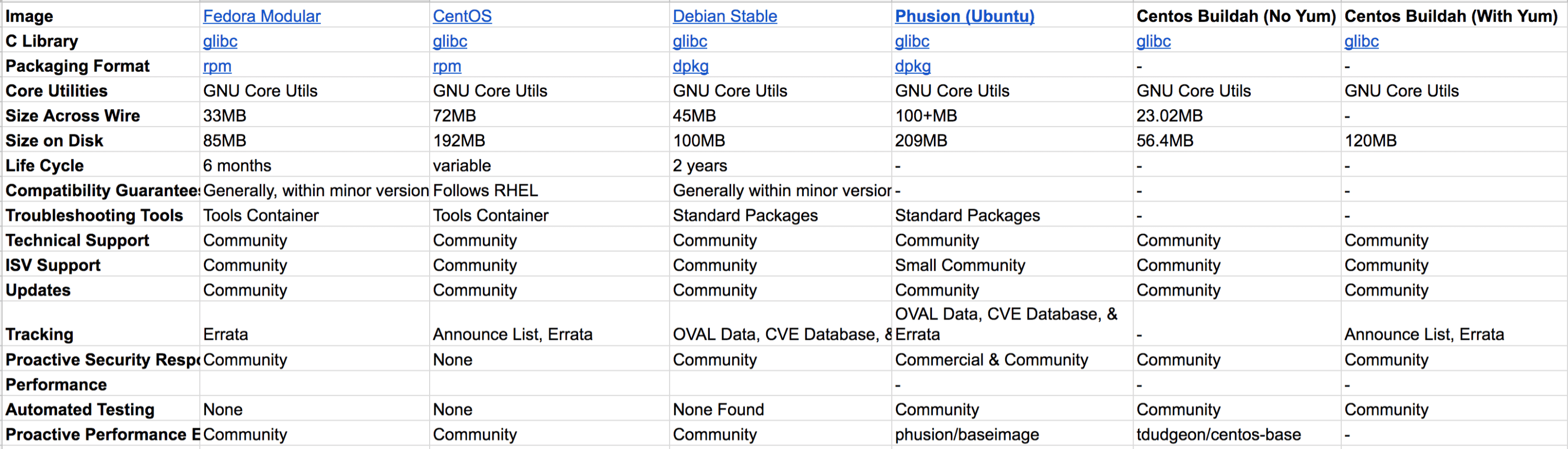
The Phusion image was an interesting one to evaluate. I’ve used this in the past and it has many fixes in for Docker and running multiple processes. I’m not sure these are needed any more on Kubernetes.
Another interesting exercise I undertook was to use Buildah to create a Centos image with only the absolute minimum packages. If you don’t care about a CVE database then this is definitely worth doing. I found this cool blog by a guy who explains exactly how to build a Centos image in a few lines of bash that results in a 23mb compressed Centos 7 image.
AWS Linux 2
Amazon Linux 2 is available on Docker Hub. It’s based on Centos 7 and has SystemD and uses the Yum package manager. Unfortunately, Amazon haven’t done anything to reduce the number of packages installed. There’s no minimal version which means you have an image that contains non essential packages and therefore a much larger surface area.
The latest Amazon Linux 2 container is 61.63mb compressed and 163mb on disk.
There are some positive trade-offs with AWS Linux. Firstly, you get OS support if you’re on AWS and have an Amazon support package. Amazon also provide a security advisory service. This service works with Amazon Image Inspector to scan for vulnerable OS packages inside your containers. I’m not sure how good the AWS security team is, or how large they are compared to the people working on Redhat, Ubuntu and Debian.
Unfortunately, Amazon Inspector doesn’t currently work with containers. So Amazon Linux 2 is probably a good option for the host operating system but not currently for your application containers.
My opinion is that if Amazon provided a minimal image with much fewer base operating packages installed, and if Inspector supported scanning containers, then this would be the winner for anyone running on AWS.
Edit: I raised a ticket on the official repo.
I think that’s the end of my base Linux image adventure. Unless somebody knows of another variant I can add. Thanks for reading all the way to the end and please leave a comment below if I’ve got something wrong.
Historical workbook values; blanks mean unknown, not No. Prices, versions, maturity labels and feature claims are not current recommendations.
Docker Base Images Compare / small (historical)
Historical snapshotRecovered comparison data. Versions, prices and availability describe the original research, not a current benchmark. Blank or damaged source values are marked unknown.
Choose columns
| Feature / source label | RHEL Atomic | Debian (stable-slim) | Ubuntu | Minideb | Alpine | Amazon Linux 2 | CentOS | Debian Stable | Phusion (Ubuntu) | Centos Buildah (No Yum) | Centos Buildah (With Yum) |
|---|---|---|---|---|---|---|---|---|---|---|---|
| C Library | glibc | glibc | glibc | glibc | musl c | glibc | glibc | glibc | glibc | glibc | glibc |
| Packaging Format | rpm | dpkg | dpkg | dpkg | apk | rpm | rpm | dpkg | dpkg | - | - |
| Core Utilities | GNU Core Utils | GNU Core Utils | GNU Core Utils | GNU Core Utils | Busybox | GNU Core Utils | GNU Core Utils | GNU Core Utils | GNU Core Utils | GNU Core Utils | GNU Core Utils |
| Size Across Wire | 30MB | 26MB | 31.76MB | 22.05MB | 2.20MB | 61.63MB | 72MB | 45MB | 100+MB | 23.02MB | - |
| Size on Disk | 78.4MB | 55.3MB | 81.4MB | 53.7MB | 4.41MB | 163MB | 192MB | 100MB | 209MB | 56.4MB | 120MB |
| Life Cycle | 6 months | - | 5 years | - | - | 5 year | variable | 2 years | - | - | - |
| Compatibility Guarantees | Generally within minor version | - | Generally within minor version | - | - | - | Follows RHEL | Generally within minor version | - | - | - |
| Troubleshooting Tools | Integrated with Technical Support | Standard Packages | Standard Packages | Standard Packages | Standard Packages | - | Tools Container | Standard Packages | Standard Packages | - | - |
| Technical Support | Commercial & Community | Community | Commercial & Community | Community | Community | Commercial | Community | Community | Community | Community | Community |
| ISV Support | Large Commercial | Community | Large Community | Community | Small Community | Commercial | Community | Community | Small Community | Community | Community |
| Updates | Commercial | Community | Community | Community | Community | Commercial | Community | Community | Community | Community | Community |
| Tracking | OVAL Data,CVE Database, VulnerabilityAPI & Errata,Lab Tools | OVAL Data, CVE Database, & Errata | OVAL Data, CVE Database, & Errata | OVAL Data, CVE Database, & Errata | Limited Database | Announce List, Errata | Announce List, Errata | OVAL Data, CVE Database, & Errata | OVAL Data, CVE Database, & Errata | - | Community |
| Security Response Team | Commercial & Community | Community | Commercial & Community | Community | - | Community | None | Community | Commercial & Community | Community | Community |
| Automated Testing | Commercial | - | - | - | Unknown | - | Unknown | Unknown | - | - | - |
| Performance Engineering Team | Commercial | Community | Community | Community | Community | Community | None | None Found | Community | Community | Community |
| Docker Pull | registry.access.redhat.com/rhel-atomic | debian:stable-slim | ubuntu | bitnami/minideb | alpine | - | Community | Community | phusion/baseimage | tdudgeon/centos-base | - |
| Notes | Unknown (damaged historical cell) | Official debian repo is constantly improving and now quite small | Slightly bigger than Minideb but seems to have the same security benefits. | Small and has CVE database. Built every 24 hours with security patches. Offical Debian container has closed the gap on size. | Small but cannot use open source vulnerability scanners as the CVE database is limited. | Amazon Inspector can be used to scan | This is quite large compared to the newer generation of images. Also lacks CVE database. | There is a slim version so no need to use this. | This is quite large compared to the newer generation of images. It does have some interesting fixes inside but I'm not sure they are applicable for running applications in containers under Kubernetes. | No Yum means can't scan easily with the various open source scanners. | This is approximately half the size of the standard Centos (200MB). Has a smaller surface area and can be scanned. No CVE Database though. |
| Sources | Unknown | Unknown | Unknown | Unknown | Unknown | Unknown | Unknown | Unknown | Unknown | Unknown | Unknown |
| Redhat Source | http://crunchtools.com/comparison-linux-container-images/ | Unknown | Unknown | Unknown | Unknown | Unknown | Unknown | Unknown | Unknown | Unknown | Unknown |
| Atomic | https://www.reddit.com/r/redhat/comments/9evo02/rhel7_atomic_base_image_free_to_use/e5s7vp9/ | Unknown | Unknown | Unknown | Unknown | Unknown | Unknown | Unknown | Unknown | Unknown | Unknown |
| Centos Buildah | https://www.informaticsmatters.com/blog/2018/04/04/smaller-containers-part-3.html | Unknown | Unknown | Unknown | Unknown | Unknown | Unknown | Unknown | Unknown | Unknown | Unknown |
| Ubuntu minimal | https://blog.ubuntu.com/2018/07/09/minimal-ubuntu-released | Unknown | Unknown | Unknown | Unknown | Unknown | Unknown | Unknown | Unknown | Unknown | Unknown |
| Minideb | https://news.ycombinator.com/item?id=15285402 | Unknown | Unknown | Unknown | Unknown | Unknown | Unknown | Unknown | Unknown | Unknown | Unknown |
| Mindeb Comparison | https://dzone.com/articles/minideb-a-minimalist-debian-based-docker-image | Unknown | Unknown | Unknown | Unknown | Unknown | Unknown | Unknown | Unknown | Unknown | Unknown |
24 rows
Sources & further reading
Spotted something that needs another look?
Help improve this page →