
You want to run containers without building and maintaining every part of Kubernetes yourself. Amazon EKS, Azure AKS and Google GKE are managed Kubernetes services: their providers run the cluster's central management components, and offer different ways to manage the machines that run your applications. Your team still deploys the applications, grants their permissions and protects their data.
EKS belongs to AWS, AKS to Microsoft Azure and GKE to Google Cloud. Existing databases, identity systems and network connections often make one the natural starting point. EKS versus AKS versus GKE becomes a useful comparison when you test how your actual application connects to those services, rather than count features across three marketing pages.
Compare the service mode as well as the provider. EKS Auto Mode automates more infrastructure than an EKS setup where you manage those components. GKE offers Standard and Autopilot choices; AKS offers Automatic alongside its other cluster options. The more the service manages, the more closely you must check whether its supported configuration fits your workload.
Check what your application needs from the cloud
Identity, network connectivity, data location, regional availability and organizational support often matter more than a marginal cluster-control-plane price. List required privileged agents, GPUs, storage, network policies, operating-system customization and compliance controls before selecting a mode.
- Write a responsibility map for control plane, nodes, add-ons, ingress, certificates, backups and workload upgrades.
- Check supported versions, upgrade windows and end-of-support behavior for the chosen region and mode.
- Exercise identity, private connectivity, ingress and storage using a representative application.
- Test node replacement, application disruption and restoring data to a separate environment.
- Estimate cost from the declared workload, including idle capacity, load balancers, disks, egress, observability and operational labor.
Portability is specific
Kubernetes API compatibility does not make IAM roles, load balancer annotations, storage classes or managed databases portable. Identify the provider-specific parts of the application and decide whether that coupling buys enough operational value. A provider feature can be a rational choice even when it makes migration harder.
Use a reversible pilot
Start with one bounded workload and keep source data recoverable. Compare the deployment and incident response experience with the current platform. Do not transfer the only production copy before restore and exit procedures work.
The recovered comparison and first-person cloud reports document earlier service behavior. They are not evidence for today's reliability, pricing or ranking. This update supplies a current decision framework and primary service descriptions, without claiming new multi-cloud benchmarks or a universal cheapest provider.
Which service should you choose?
Start with EKS for applications closely tied to AWS services, AKS for applications already built around Azure, and GKE for applications and data already in Google Cloud. If you can choose freely, run the same small application on the relevant modes and compare upgrades, access, recovery and a realistic monthly bill. Prefer the service your team can run reliably; this guide does not identify a universal performance or price winner.
Historical Kubedex content
Original publication: 2018-10-09T17:24:45+00:00. Preserved for context. Commands, versions, prices and results below reflect the original research.
Last Updated on December 29, 2018
There have been many comparisons done between these cloud hosted Kubernetes providers already. However, probably none as honest as this one.
Below is a screenshot of the Google sheet comparing GKE, AKS and EKS. You may notice that some of the cells have comments in already. These comments link to the place I got the information from.
Edit: The spreadsheet now also includes IBM IKS and Alibaba Cloud ACK too.
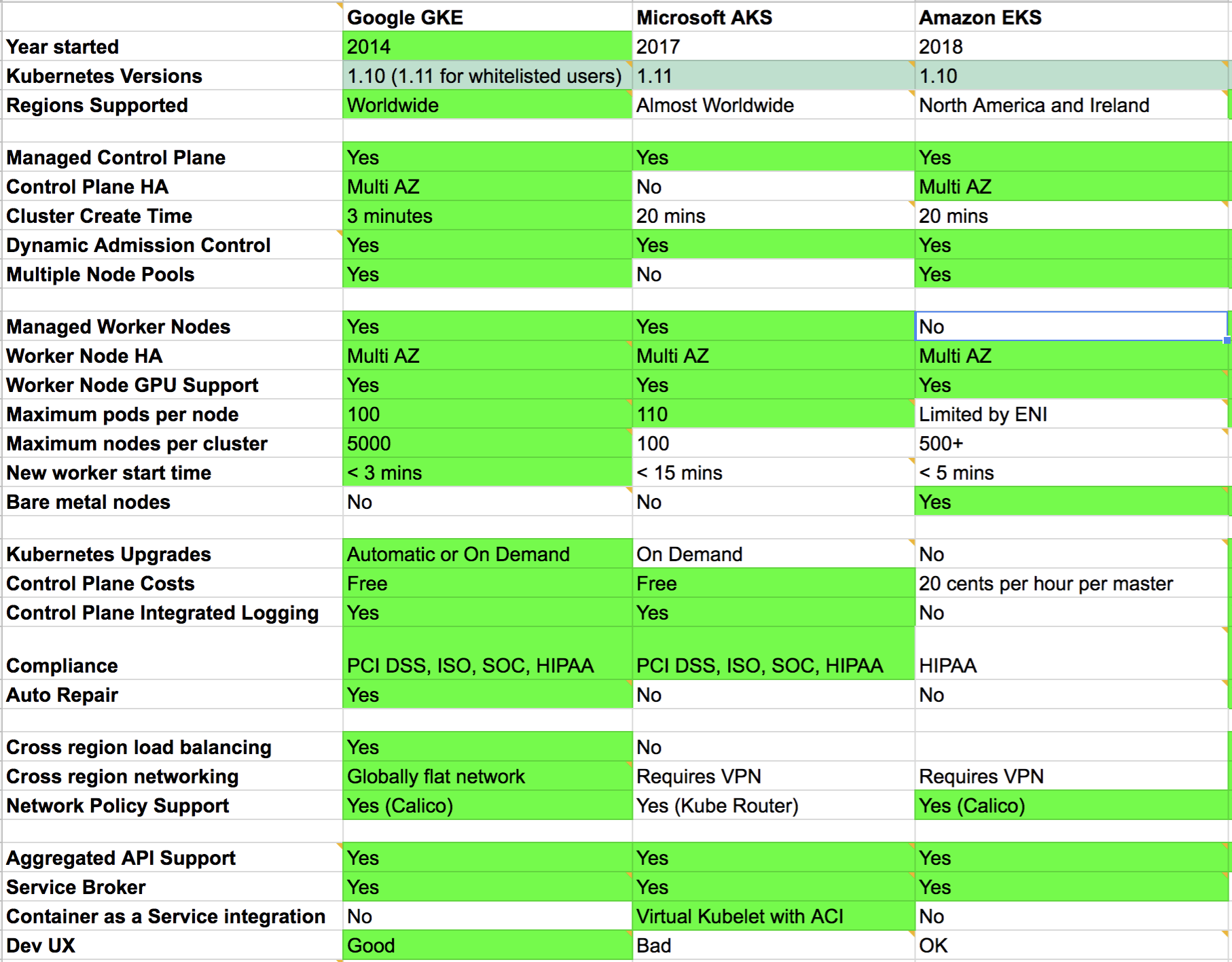
If anything is incorrect please add a comment to the sheet or drop me a message below.
This is going to be a brutal comparison and I’m happy to change my mind if somebody can present some factual evidence.
As it stands today I’ve personally used EKS, and AWS in general a lot. I’ve used GKE a bit but only with my own personal credits doing Kubernetes The Hard Way and spinning up a very quick GKE test cluster a while ago. I’d like to use it more but we’re on AWS at work.
Azure is something I’ve avoided since using it for a few months last year. I was working as a Microsoft partner so it was unavoidable back then. Parts of it are alright but the user experience coming from an Amazon background is worlds apart.
I’ll split my recommendation up into a few categories based on scenario.
Greenfield Projects
I’ve been trying to weigh up whether to advise people to review all of the services across Google, AWS and Microsofts clouds. Kubernetes is a single component of a larger system and other factors will come into play. However, there really isn’t much difference between what each cloud offers nowadays.
Marketing teams may claim otherwise but when you look at what most companies need in the way of features they all pretty much have it covered.
So let’s simplify things and say you only want to run Kubernetes. The answer is clear. Go with GKE every time.
Why? It’s cheaper, faster and better in almost every single measurable way than the competition.
You may look at the 3 minutes vs 20 minute cluster creation time and think it’s not a big deal. How many times do you really build a cluster anyway? Well, not very often if they take 20+ minutes and sometimes fail because you will change your entire workflow to fit around it.
If, however, clusters only take 3 minutes to create you will find yourself using disposable test infrastructure and working in an entirely different way.
Networking is the other reason. Google is miles ahead of everyone here. Similar story with HA and scaling.
I won’t call out every row from the spreadsheet as a reason as I think the data speaks for itself.
We’re already locked into AWS
You probably don’t have much of a choice. Kubernetes on its own isn’t reason enough to do a cloud migration.
Hopefully, you’ll see this comparison and know that life could be worse. EKS is still new and the Amazon teams iterate quickly. I doubt Amazon will ever match Google for network speed or VM boot times but your life will still be tolerable.
It would be nice if they could enable the default Admission Controllers on the masters. Also, I have no idea why cluster creation is so slow. I’ve measured cluster build times at work and they always take around 20 minutes to build to the point I can run integration tests on them.
Edit: admission controllers have now been added.
The other annoyance is the lack of worker management. Hopefully the EKS guys can package this up like how GKE does it.
An interesting thing I noticed was that EKS supports i3.metal instances so this is the only Kubernetes solution that supports bare metal workers. This may be useful for some people.
My company is looking at Azure
Again, not really much you can do. My advice is to setup a demo with AKS and GKE and try to convey the developer experience to the decision makers.
Show them how some things on Azure need to be done in a clunky web UI, other things need Powershell and other random stuff uses the CLI. Try to get people to account for the slowness of operations and how that effects the design of DevOps pipelines and automation in general. Yes, you can make it work, but why make life hard for yourself.
It’s possible you’re locked in with something like Active Directory as a requirement which means you’re probably out of luck.
I’m being serious when I say this: if the company I’m working for decided to migrate to Azure I’d find a new job. By the way, this wouldn’t have always been the case. Back in my youth I managed Windows servers, I fixed broken TFS installations and I walked into server rooms and replaced tapes every week.
Nowadays I want to programmatically control infrastructure. It needs to be fast and bug free so that I can build cool automation on top. Working on something like Azure, especially after having worked on AWS for years, would be extremely depressing.
Edit: To quantify exactly how slow and buggy Azure AKS is you may want to read about project Dolos.
Edit: AKS have released an update that reduces cluster create time to less than 10 minutes.
To all of you who are moving from on-premise into Azure it could be a step up in terms of agility so I wish you the best of luck.
So there you have it! This site needed a comparison of Kubernetes options that run in the cloud. My recommendation is go with Google GKE whenever possible. If you’re already on AWS then trial EKS but it doesn’t really give you that much currently. You may be better off looking at Kops or some other cloud installer until they add managed workers and other integrations.
Edit: Evaluating Kubernetes On-Prem options? We now have a comparison blog to cover that too.
Additional Reading
More information about each cloud offering from Kuberiter
Another good comparison although a bit out of date now
The guys at Caylent provide some nice bullet points
Historical workbook values; blanks mean unknown, not No. Prices, versions, maturity labels and feature claims are not current recommendations.
Historical workbook values; blanks mean unknown, not No. Prices, versions, maturity labels and feature claims are not current recommendations.
Kubernetes Cloud Comparison / Comparison (historical)
Historical snapshotRecovered comparison data. Versions, prices and availability describe the original research, not a current benchmark. Blank or damaged source values are marked unknown.
Choose columns
| Feature / source label | Google GKE | Amazon EKS | Microsoft AKS | IBM IKS | Notes |
|---|---|---|---|---|---|
| Year started (GA) | 2014.0 | 2018.0 | 2017.0 | 2017.0 | Google has a 3 year lead on everyone else and it shows! |
| Kubernetes GA Versions | Unknown (damaged historical cell) | Unknown (damaged historical cell) | Unknown (damaged historical cell) | Unknown (damaged historical cell) | Those are automatically scraped from specific URL's which you can find in the corresponding comment. |
| Regions Supported | Worldwide | Worldwide | Worldwide | Worldwide | Microsoft is missing some regions like South America |
| Managed Control Plane | Yes | Yes | Yes | Yes | Unknown |
| Control Plane HA | Multi AZ | Multi AZ | No | Multi AZ | No control plane HA on AKS is quite bad |
| Cluster Create Time | 3 minutes | 9 mins | 15 mins | 15 mins | Unknown |
| Dynamic Admission Control | Yes | Yes | Yes | Yes | Important for features like Istio sidecar injection |
| Multiple Node Pools | Yes | Yes | Yes | Yes | Unknown |
| SLA | 99.95 (regional), 99.5 (zonal) | 99.95 | 99.95(AzureAZ), 99.9 | 99.99(MZRs), 99.90(SingleZone) | Unknown |
| Price | 10 cents per hour per master | 20 cents per hour per master | Free | Free | GKE is overall cheapest |
| Compliance | PCI DSS, ISO, SOC, HIPAA | HIPAA, PCI, PCI DSS, ISO | PCI DSS, ISO, SOC, HIPAA | CSA, PCI, ISO, SOC, CJIS, DoD DISA, FedRAMP, FFIEC, FISMA, ITAR, FFIEC, HIPAA, HITRUST | Unknown |
| Kubernetes Marketplace | Yes | Yes | Yes | No | Unknown |
| Integrations | GCP Ecosystem | AWS Ecosystem | Azure Ecosystem | IBM Ecosystem | Unknown |
| Dev UX | Good | OK | Bad | OK | Any developer would choose GKE if they trialled all three |
| On-Premises Version | Yes (Anthos On-Prem) | Yes | Yes | No | Unknown |
| Managed Worker Nodes | Yes | Yes | Yes | Yes | EKS workers are setup with Cloudformation or Terraform |
| Worker Node HA | Multi AZ | Multi AZ | Multi AZ | Multi AZ | Unknown |
| Worker Node Live Migration | Yes | No | No | Yes | Unknown |
| Worker Node Container Runtime Support | Docker, Containerd | Docker | Docker | Containerd | Unknown |
| Worker Node Windows Container Support | Yes | Yes | Yes | No | Unknown |
| Worker Node GPU Support | Yes | Yes | Yes | Yes | Unknown |
| Worker Node TPU Support | Yes | No | No | No | Unknown |
| Maximum pods per node | 110.0 | Limited by ENI by default | 110.0 | 110.0 | Azure CNI can be increased to 110. Be careful on EKS when selecting worker instance type. |
| Maximum nodes per cluster | 5000.0 | 1000.0 | 100.0 | 1000.0 | Notify EKS team if going above 500 nodes so they can vertically scale control plane |
| New Worker Node Start time | < 2 mins | < 5 mins | < 10 mins | < 5 mins | Azure VM starts are slow |
| Bare metal Worker Node | Yes | Yes | No | Yes | GKE have bare metal in early access |
| Worker Nodes Autoscaling | Yes | Yes (not managed) | Yes (preview) | Yes | Unknown |
| Worker Nodes Auto-provisioning | Yes | No | No | Yes | Unknown |
| Kubernetes Upgrades | Automatic or On Demand | Automatic security, On Demand upgrades | On Demand | On Demand | On AWS you can upgrade the masters but then you need to do the workers yourself. AKS upgrades can be problematic. |
| Control Plane Integrated Logging | Yes | Yes | Yes | Yes | Unknown |
| Auto Repair | Yes | No | Yes | Yes | Unknown |
| Application Layer Secret Encryption | Yes | No | No | Yes | Unknown |
| Cross region load balancing | Yes | No | No | Yes | Unknown |
| Cross region networking | Globally flat network | Requires VPC Peering | Requires VPN | VRF | Unknown |
| Network Policy Support | Yes (Calico, Cilium) | Yes (Calico) | Yes (Calico, Azure Network Policies*) | Yes (Calico) | Unknown |
| Private Cluster Network Support | Yes | Yes | Yes | Yes | Unknown |
| Aggregated API Support | Yes | Yes | Yes | Yes | Unknown |
| Service Broker | Yes | Yes | Yes | Yes | Unknown |
| Container as a Service integration | Cloud Run | Virtual Kubelet with Fargate | Virtual Kubelet with ACI | No | AWS working on Fargate integration with EKS |
| Vertical Pod Autoscaler | Yes | Yes | Yes | No | Unknown |
| Workload Identity | Yes (even via AWS IAM) | Yes | Yes (in preview) | Yes | Unknown |
| Knative Support | Yes with CloudRun | No | Yes | Yes (Experimental) | Unknown |
| Services Mesh Network Integration | Yes (Istio cluster add-on) (beta) | App Mesh | No (in preview) | Yes (Istio cluster add-on) | Unknown |
| Services Mesh - Fully managed | Yes with ASM | No | No | Yes | Unknown |
| Spot/Preemptibile Worker Nodes support | Yes | Yes | Yes | No | Unknown |
| Monitoring Integration | Yes (Cloud Monitoring) | Yes (Container Insight) | Yes | Yes (Sysdig) | Unknown |
| Sandbox support? (eg: gVisor) | Yes | No | No | No | Unknown |
| Binary Authorization Support | Yes | No | No | Yes | Unknown |
| Intranode Visibility | Yes | No | No | No | Unknown |
| Proprietary Ingress Controller | Yes | No | Yes | Yes | Unknown |
| Proprietary Multi-Cluster (global) Ingress | Yes | No | No | Yes | Unknown |
| Ingress managed SSL Certificate | Yes | No | No | Yes | Unknown |
| Release Channels | Yes (stable,regular,rapid) | No | No | No | Unknown |
| Unknown | * Azure CNI only | Unknown | Unknown | Unknown | Unknown |
54 rows
Kubernetes Cloud Comparison / Sources (historical)
Historical snapshotRecovered comparison data. Versions, prices and availability describe the original research, not a current benchmark. Blank or damaged source values are marked unknown.
Choose columns
| Sources: |
|---|
| Blog: https://kubedex.com/google-gke-vs-microsoft-aks-vs-amazon-eks/ |
| https://resources.kuberiter.com/k8scpcchart |
| https://blog.hasura.io/gke-vs-aks-vs-eks-411f080640dc |
| https://caylent.com/kubernetes-managed-service/ |
| https://feedback.azure.com/forums/914020-azure-kubernetes-service-aks |
| https://docs.microsoft.com/en-us/azure/azure-monitor/insights/container-insights-overview |
6 rows
Kubernetes Cloud / Sheet1 (historical)
Historical snapshotRecovered comparison data. Versions, prices and availability describe the original research, not a current benchmark. Blank or damaged source values are marked unknown.
Choose columns
| Feature / source label | Google GKE | Microsoft AKS | Amazon EKS | Alibaba Cloud ACK | Notes |
|---|---|---|---|---|---|
| Year started | 2014.0 | 2017.0 | 2018.0 | 2017.0 | Unknown |
| Kubernetes Versions | 1.10 (1.11 for whitelisted users) | 1.11 | 1.1 | 1.11 | Seems Microsoft AKS keeps most up to date |
| Regions Supported | Worldwide | Almost Worldwide | North America and Ireland | Worldwide | Microsoft is missing some regions like South America |
| Managed Control Plane | Yes | Yes | Yes | Yes | Unknown |
| Control Plane HA | Multi AZ | No | Multi AZ | Yes | No master HA on AKS is quite bad |
| Cluster Create Time | 3 minutes | 20 mins | 20 mins | 4 mins | Unknown |
| Dynamic Admission Control | Yes | Yes | No | Yes | Important for features like Istio sidecar injection |
| Multiple Node Pools | Yes | No | Yes | Yes | Unknown |
| Managed Worker Nodes | Yes | Yes | No | Yes | EKS workers are setup with Cloudformation or Terraform |
| Worker Node HA | Multi AZ | Multi AZ | Multi AZ | Multi AZ | Unknown |
| Worker Node GPU Support | Yes | Yes | Yes | Yes | Unknown |
| Maximum pods per node | 100.0 | 110 (kubenet) or 30 (cni) | Limited by ENI | 100.0 | Azure CNI can be increased to 110. Be careful on EKS when selecting worker instance type. |
| Maximum nodes per cluster | 5000.0 | 100.0 | 500+ | 500.0 | Notify EKS team if going above 500 nodes so they can vertically scale control plane |
| New worker start time | < 3 mins | < 15 mins | < 5 mins | <3 mins | Azure VM starts are slow |
| Bare metal nodes | No | No | Yes | Yes | GKE have bare metal in early access |
| Kubernetes Upgrades | Automatic or On Demand | On Demand | No | On Demand | On AWS you can upgrade the masters but then you need to do the workers yourself. AKS upgrades can be problematic. |
| Control Plane Costs | Free | Free | 20 cents per hour per master | Free | GKE is overall cheapest |
| Control Plane Integrated Logging | Yes | Yes | No | Yes | Unknown |
| Compliance | PCI DSS, ISO, SOC, HIPAA | PCI DSS, ISO, SOC, HIPAA | HIPAA | PCI DSS(ongoing) | AKS got HIPAA a couple of weeks ago |
| Auto Repair | Yes | No | No | No | Unknown |
| Cross region load balancing | Yes | No | Unknown | Unknown | Unknown |
| Cross region networking | Yes | No (manual config) | No | Yes(Express Connect) | Unknown |
| Network Policy Support | Yes (Calico) | Yes (Kube Router) | Yes (Calico) | Yes(Terway) | AKS are working on Calico support |
| Aggregated API Support | Yes | Yes | Yes | Yes | Unknown |
| Service Broker | Yes | Yes | Yes | Yes | Unknown |
| Container as a Service integration | No | Virtual Kubelet with ACI | No | Serverless Kubernetes VIrtual Kubelet with ECI | AWS working on Fargate integration with EKS |
| Dev UX | Good | Poor | Mediocre | Good | Any developer would choose GKE if they trialled all three |
| Integrations | GCP Ecosystem | Azure Ecosystem | AWS Ecosystem | Alibaba Ecosystem | Unknown |
| Sources: | Unknown | Unknown | Unknown | Unknown | Unknown |
| https://resources.kuberiter.com/k8scpcchart | Unknown | Unknown | Unknown | Unknown | Unknown |
| https://blog.hasura.io/gke-vs-aks-vs-eks-411f080640dc | Unknown | Unknown | Unknown | Unknown | Unknown |
| https://caylent.com/kubernetes-managed-service/ | Unknown | Unknown | Unknown | Unknown | Unknown |
| https://feedback.azure.com/forums/914020-azure-kubernetes-service-aks | Unknown | Unknown | Unknown | Unknown | Unknown |
33 rows
Sources & further reading
Spotted something that needs another look?
Help improve this page →