
Teams running many services often need to see which calls fail and establish which service is talking to which. Linkerd 2 adds small network proxies alongside application workloads and manages them as a shared communication layer, known as a service mesh. It provides a place to apply service identity and traffic controls without implementing every feature separately in each application. Adoption still changes the request path, so release choice and application behavior need review.
Current guidance
Linkerd 2 is distinct from the older Linkerd 1 architecture. Select current release and support information from its own distribution documentation.
Evaluate service identity, policy, certificate behavior, proxy resource use and supported workload protocols for the exact version. Do not inherit a historical comparison score. Match documentation to the exact edge release or vendor distribution you deploy. The project describes edge artifacts as generally production ready, but they can include breaking changes and individual releases may be marked not recommended. Since February 2024, stable release artifacts have been supplied by the vendor community rather than the open source project.
Roll out to a bounded application first and exercise proxy/control-plane failure as well as normal traffic. Preserve application connectivity during removal or rollback. No new Linkerd performance benchmark is claimed in this directory review.
Historical upstream link check · 2026-10-09
The recorded upstream address responded successfully (HTTP 200) on 2026-10-09. GitHub does not mark linkerd/linkerd2 archived or disabled; this does not establish active maintenance, support or compatibility. Link availability does not certify the historical installation instructions or current security support.
Website availability is separate from project, chart and image support. Use the current guidance and primary sources on this page to assess the distribution.
Historical Kubedex content
Original publication: 2018-09-26T09:51:36+00:00. Preserved for context. Commands, versions, prices and results below reflect the original research.
Linkerd is a service sidecar and service mesh for Kubernetes and other frameworks. It makes running your service easier and safer by giving you runtime debugging, observability, reliability, and security–all without requiring any changes to your code.
You may be interested in our service mesh comparison article.
Linkerd has three basic components: a UI (both command-line and web-based), a data plane, and a control plane. You run Linkerd by installing the CLI on your local system, then by using the CLI to install the control plane into your cluster, and finally by adding Linkerd’s data plane to each service you want to run Linkerd on. (See Adding Your Service for more.)
Once a service is running with Linkerd, you can use Linkerd’s UI to inspect and manipulate it.
Architecture
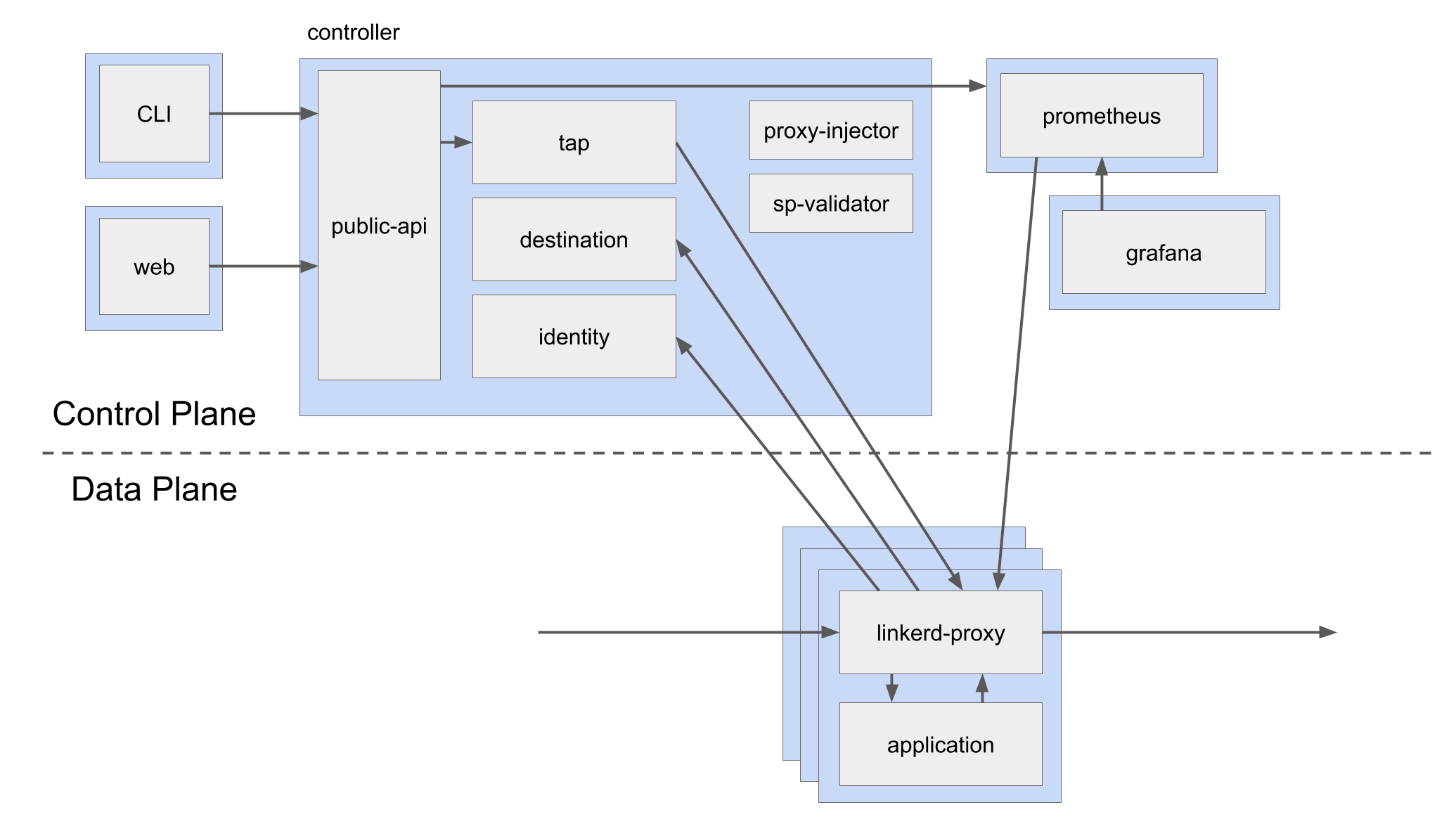
Linkerd’s UI is comprised of a CLI (helpfully called linkerd) and a web UI. The CLI runs on your local machine; the web UI is hosted by the control plane.
The Linkerd control plane is composed of a number of services that run on your cluster and drive the behavior of the data plane. These services accomplish various things–aggregating telemetry data, providing a user-facing API, providing control data to the data plane proxies, etc. By default, they run in a dedicated linkerd namespace.
Finally, Linkerd’s data plane is comprised of ultralight, transparent proxies that are deployed in front of a service. These proxies automatically handle all traffic to and from the service. Because they’re transparent, these proxies act as highly instrumented out-of-process network stacks, sending telemetry to, and receiving control signals from, a control plane. This design allows Linkerd to measure and manipulate traffic to and from your service without introducing excessive latency.
The post linkerd2 appeared first on kubedex.com.
Sources & further reading
Spotted something that needs another look?
Help improve this page →